
Disclosure: Tripvio published this comparison. We checked TripIt’s public product, pricing, sharing, and road-trip pages on July 20, 2026 and verified Tripvio workflows in the current product. Feature availability and prices can change; check each provider’s current information before choosing.
The short answer
Choose TripIt if your highest priority is turning booking confirmations into a consolidated itinerary, then receiving travel-day alerts and guidance through its Free and Pro offerings. It is particularly compelling for frequent travelers whose planning is already booking-led.
Choose Tripvio if you want bookings to feed a trip you can actively shape with AI, templates, maps, recommendations, documents, budgets, collaborators, and in-trip planning support.
Start with one flight confirmation
Take a couple’s 10-day Italy trip. The first thing they have is an airline confirmation. TripIt’s core workflow is purpose-built for that moment: forward confirmation emails and TripIt creates a comprehensive itinerary. Its public materials also describe access across devices, calendar synchronization, sharing, document uploads, maps, and offline itinerary access. TripIt Pro adds travel alerts and navigation-oriented assistance.
Tripvio can begin from eligible synced travel emails too, but that is just one entry point. The couple can also start with an AI plan, create days manually, upload a confirmation for smart extraction, or select a curated template. From there, they can turn “we should do Florence” into a scheduled day, add places from AI or recommendations, and keep the booking data next to the planning decisions it affects.
| Need | Tripvio | TripIt |
|---|---|---|
| Build the first itinerary | AI, manual planning, templates, eligible email sync, or smart uploads. | Automatically organizes forwarded or connected booking confirmations; manual plans can be added. |
| Shape the days | Add places manually, from maps, AI, and recommendations; keep a shared Maybe list for votes. | Organize travel plans and add items, notes, and photos to the itinerary. |
| Coordinate people | Collaborators can plan together, vote on ideas, access shared trip details, and split expenses. | Sharing supports traveler, planner, and viewer permission levels. |
| Travel records | Document hub, OCR-assisted uploads, and documents attached to itinerary items. | Supports documents, photos, QR codes, and itinerary details. |
| During the trip | Maps, safety hub, Visa Check, checklists, budget tools, and AI companion support. | Offline itinerary access; TripIt Pro adds real-time alerts and travel guidance. |
TripIt’s strength: reliable booking organization
TripIt has a clear, proven focus. When reservations live across airline, hotel, car-rental, rail, and event emails, a single automatically assembled itinerary reduces friction. Its sharing options are also useful when someone needs to travel, help plan, or simply view the itinerary without editing it.
For a frequent business traveler or a traveler who already knows the trip’s structure, that focused experience may be exactly right. This comparison does not assume that a larger feature set is automatically better.
Tripvio’s strength: the trip keeps evolving
For leisure trips and groups, bookings are often the beginning of the work—not the end. A flight confirmation does not decide whether the group wants a museum, a food tour, or a beach day. Tripvio gives that evolving plan a home: save future ideas to Bucket List, put active possibilities in the Maybe list, vote with collaborators, and add a chosen place directly into an itinerary day.
Tripvio also keeps travel logistics connected to the plan. Add collaborators, attach a hotel confirmation to the check-in item, add insurance to the document hub, review a visa requirement using Visa Check, and keep the group’s plan, map, and budget in the same trip.
Budgets and documents
TripIt documents describe a centralized itinerary with booking details, documents, and photos. Tripvio extends the trip record into a group budget: add expenses manually or from uploads, use eligible details from synced confirmations when available, and split shared expenses with travel collaborators.
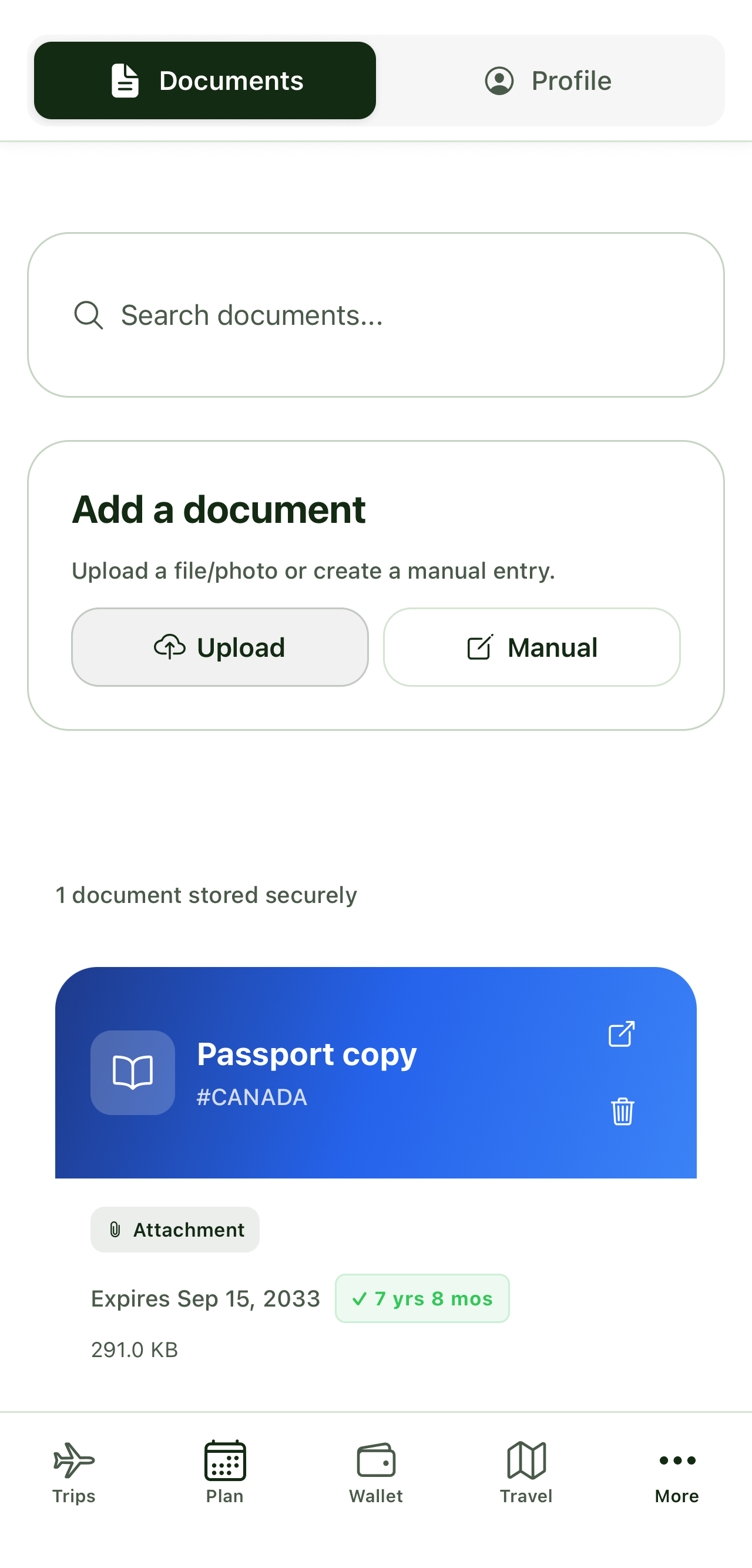
Tripvio’s document hub is designed for more than a booking record. Store passport, visa, travel-insurance, and reservation copies manually or through OCR-assisted uploads. When a document belongs to a particular plan—such as a rail ticket or hotel confirmation—it can be attached to that itinerary item.
Travel-day help and offline access
TripIt documents offline access to plans and positions Pro around real-time alerts, reminders, alternate-flight help, and airport navigation. Those are meaningful benefits for travelers whose main concern is keeping bookings and connections on track.
Tripvio addresses a broader on-the-ground workflow. Its map shows itinerary and landmark pins, and travelers can add map discoveries to their schedule. Premium includes offline itinerary, document, and map access. Every user can access offline safety information, while the Safety Hub offers advisories, location sharing with collaborators, and an emergency-services shortcut. Tripvio’s AI companion can help adapt a plan around disruptions and budget questions, but it is planning support—not a substitute for airlines, emergency services, insurers, or official travel authorities.
Who should pick TripIt?
- Frequent travelers who mainly need booking confirmations organized immediately.
- Travelers who value TripIt Pro alerts and its travel-day guidance.
- People whose itinerary is largely determined by reservations rather than a group planning process.
Who should pick Tripvio?
- Couples and groups who want bookings, ideas, decisions, costs, documents, and safety information in one active workspace.
- Travelers who want multiple planning starts: AI, templates, manual itinerary building, email sync, or smart uploads.
- International travelers who need Visa Check, travel-document storage, maps, and offline access alongside the itinerary.
Methodology and sources
Tripvio feature descriptions are based on the current app as reviewed July 20, 2026. TripIt information was checked against TripIt’s product page, Free and Pro pricing page, sharing guide, and road-trip planner page. TripIt is a trademark of its respective owner.
Quick answers
Can Tripvio import every type of booking?
Tripvio can synchronize eligible travel emails and extract information from supported uploads. Review imported details and confirm important travel information before relying on it.
Can a collaborator help plan without traveling?
Tripvio collaborators can participate in the shared trip planning process. Set the access appropriate to the people you invite and avoid sharing sensitive documents unless needed.
Is Visa Check official travel authorization?
No. It is planning guidance. Always confirm the latest entry, visa, passport, health, and transit requirements through official sources before traveling.
Turn confirmation emails into a trip your whole group can plan and use.